martes, 24 de marzo de 2020

ANSIBLE Routers Cisco


En este laboratorio vamos a usar ansible para sacar el backup de los routers y guardarlo en una carpeta (/bakups)

1. Instalacion de ansible


sudo apt update
sudo apt install software-properties-common
sudo apt-add-repository --yes --update ppa:ansible/ansible

sudo apt install ansible

2. Crear  el archivo de configuracion de ansible
tutorial@tutorial:~/myproject$ cat ansible.cfg
[defaults]
inventory      = ./hosts.cfg

3. Creacion del archivo de inventario (hosts.cfg)

tutorial@tutorial:~/myproject$ cat hosts.cfg
[all:vars]
ansible user=tutorial
ansible_ssh_pass=tutorial
ansible_network_os=ios
ansible_connection=network_cli

[Routers]
R1 ansible_host=1.1.1.1
R2 ansible_host=2.2.2.2
R3 ansible_host=3.3.3.3

4 Creacion de playbook

tutorial@tutorial:~/myproject$ cat backup.yml
---
- name: Backup
  hosts: Routers
  gather_facts: False
  connection: local
  tasks:
          - name: Show run
            ios_command:
                    commands:
                        - show run
            register: config

          - name: save output
            copy:
                    content: "{{config.stdout[0]}}"
                    dest: "./backups/{{inventory_hostname}}-config.txt"

5. Ejecucion del playbook

tutorial@tutorial:~/myproject$ ansible-playbook backup.yml

PLAY [Backup] ******************************************************************

TASK [Show run] ****************************************************************


TASK [save output] *************************************************************
ok: [R3]
ok: [R2]
ok: [R1]

PLAY RECAP *********************************************************************
R1                         : ok=2    changed=0    unreachable=0    failed=0    skipped=0    rescued=0    ignored=0
R2                         : ok=2    changed=0    unreachable=0    failed=0    skipped=0    rescued=0    ignored=0

R3                         : ok=2    changed=0    unreachable=0    failed=0    skipped=0    rescued=0    ignored=0


6. Mostrar backups de configuraciones


tutorial@tutorial:~/myproject$ ls -al backups/
total 20
drwxrwxr-x 2 tutorial tutorial 4096 Mar 25 03:30 .
drwxrwxr-x 3 tutorial tutorial 4096 Mar 25 03:31 ..
-rw-rw-r-- 1 tutorial tutorial 1351 Mar 25 03:30 R1-config.txt
-rw-rw-r-- 1 tutorial tutorial 1319 Mar 25 03:30 R2-config.txt
-rw-rw-r-- 1 tutorial tutorial 1320 Mar 25 03:30 R3-config.txt


miércoles, 16 de mayo de 2018

LISP basico


R1#show ip lisp map-cache
LISP IPv4 Mapping Cache for EID-table default (IID 0), 2 entries

0.0.0.0/0, uptime: 00:09:23, expires: never, via static send map-request
  Negative cache entry, action: send-map-request
192.168.12.0/24, uptime: 00:06:40, expires: 23:53:12, via map-reply, complete
  Locator      Uptime    State      Pri/Wgt
  192.168.1.2  00:06:40  up          10/50


R3#sh lisp site
LISP Site Registration Information

Site Name      Last      Up   Who Last             Inst     EID Prefix
               Register       Registered           ID
SITE1          00:00:25  yes  192.168.1.1                   192.168.11.0/24
SITE2          00:00:26  yes  192.168.1.2                   192.168.12.0/24


LISP Encapsulation Map-Request 


LISP Map-Register


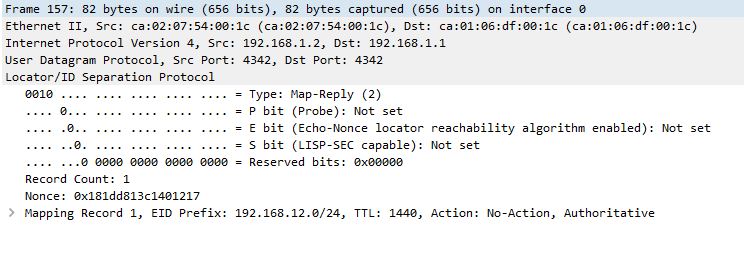
LISP Map-Reply


domingo, 2 de abril de 2017

OSPF MULTIAREA DMVPN TRACK


.


1 DMVPN R5:HUB;   
     R1, R2, R3  SPOKEs

2. Configurar OSPF Multiarea
R5 Interfaces lo 10:     192.168.10.1/27
                   lo 11:     192.168.11.1/24
                    lo 12      192.168.12.1/24
                    lo 13:     192.168.13.1/24
Sumarizar

3. IP SLA si lo 0 de R5 este activo el trafico de R7 vaya por R1, en caso contrario que sea R2


sábado, 25 de marzo de 2017

OSPF Multiarea


OSPF Multiarea


                                        Area 10 totally stub area
                                        Area 30 totally nssa area


domingo, 19 de marzo de 2017

BGP ebgp Multihop , next-hop-self Route-reflector

BGP  ebgp  multi-hop, Route reflector , next-hop-self


R1
router bgp 100
 bgp log-neighbor-changes
 neighbor 192.168.10.1 remote-as 100
router ospf 1
 network 1.1.1.0 0.0.0.255 area 0
 network 192.168.10.0 0.0.0.3 area 0


R2
router bgp 100
 bgp log-neighbor-changes
 neighbor 192.168.10.2 remote-as 100
 neighbor 192.168.10.2 route-reflector-client
 neighbor 192.168.10.5 remote-as 100
 neighbor 192.168.10.5 route-reflector-client
router ospf 1
 network 2.2.2.0 0.0.0.255 area 0
 network 192.168.10.0 0.0.0.3 area 0
 network 192.168.10.4 0.0.0.3 area 0


R3

R3#sh run | sec bgp
router bgp 100
 bgp log-neighbor-changes
 neighbor 192.168.10.6 remote-as 100
 neighbor 192.168.10.6 route-reflector-client
 neighbor 192.168.10.10 remote-as 100
 neighbor 192.168.10.10 route-reflector-client

router ospf 1
 network 3.3.3.0 0.0.0.255 area 0
 network 192.168.10.4 0.0.0.3 area 0
 network 192.168.10.8 0.0.0.3 area 0


R4#sh run | sec bgp
router bgp 100
 bgp log-neighbor-changes
 network 1.1.1.0 mask 255.255.255.0
 network 2.2.2.0 mask 255.255.255.0
 network 3.3.3.0 mask 255.255.255.0
 network 4.4.4.0 mask 255.255.255.0
 network 192.168.10.0 mask 255.255.255.252
 network 192.168.10.4 mask 255.255.255.252
 network 192.168.10.8 mask 255.255.255.252
 neighbor 5.5.5.5 remote-as 200
 neighbor 5.5.5.5 ebgp-multihop 2
 neighbor 5.5.5.5 update-source Loopback0
 neighbor 192.168.10.9 remote-as 100
 neighbor 192.168.10.9 next-hop-self

router ospf 1
 network 4.4.4.0 0.0.0.255 area 0
 network 192.168.10.8 0.0.0.3 area 0


R5
router bgp 200
 bgp log-neighbor-changes
 network 5.5.5.0 mask 255.255.255.0
 network 6.6.6.0 mask 255.255.255.0
 network 172.16.11.0 mask 255.255.255.252
 neighbor 4.4.4.4 remote-as 100
 neighbor 4.4.4.4 ebgp-multihop 2
 neighbor 4.4.4.4 update-source Loopback0
 neighbor 172.16.11.2 remote-as 200
 neighbor 172.16.11.2 next-hop-self

router eigrp 1
 network 5.5.5.0 0.0.0.255
 network 172.16.11.0 0.0.0.3


miércoles, 15 de marzo de 2017

DMVPN IPSEC


SPOKE1

crypto isakmp policy 10
 encr aes
 authentication pre-share
 group 5
crypto isakmp key cisco123 address 0.0.0.0

crypto ipsec transform-set TSET esp-aes esp-sha-hmac

crypto ipsec profile cisco
 set security-association lifetime seconds 900
 set transform-set TSET
interface Loopback0
 ip address 1.1.1.1 255.255.255.0

interface Tunnel0
 ip address 192.168.0.1 255.255.255.0
 no ip redirects
 ip nhrp map 192.168.0.3 200.0.0.9
 ip nhrp map multicast 200.0.0.9
 ip nhrp network-id 100
 ip nhrp nhs 192.168.0.3
 ip ospf network broadcast
 ip ospf priority 0
 tunnel source Ethernet0/0
 tunnel mode gre multipoint
 tunnel protection ipsec profile cisco

HUB
====
crypto isakmp policy 10
 encr aes
 authentication pre-share
 group 5
crypto isakmp key cisco123 address 0.0.0.0
crypto ipsec transform-set TSET esp-aes esp-sha-hmac
crypto ipsec profile cisco
 set security-association lifetime seconds 900
 set transform-set TSET

interface Loopback0
 ip address 3.3.3.3 255.255.255.0

interface Tunnel0
 ip address 192.168.0.3 255.255.255.0
 no ip redirects
 ip nhrp map multicast dynamic
 ip nhrp map multicast 200.0.0.9
 ip nhrp network-id 100
 ip ospf network broadcast
 ip ospf priority 10
 tunnel source Ethernet0/0
 tunnel mode gre multipoint
 tunnel protection ipsec profile cisco


jueves, 18 de agosto de 2016

EVN Route Leaking

Easy Virtual Network-  Route Leaking 


Redes virtuales con replicación de rutas entre vrf 
En este caso el VRF servicio  sera replicado a otras VRFs


ROUTER R2

vrf definition cliente1
 vnet tag 100
 !
 address-family ipv4
  route-replicate from vrf servicio unicast static
 exit-address-family
!
ip route vrf cliente1 192.168.40.0 255.255.255.0 10.10.10.2
ip route vrf servicio 192.168.50.0 255.255.255.0 10.10.10.2
!


ROUTER R3

vrf definition servicio
 vnet tag 300
 !
 address-family ipv4
  route-replicate from vrf cliente1 unicast static
 exit-address-family
!
ip route vrf cliente1 192.168.30.0 255.255.255.0 10.10.10.1


R2#routing-context vrf servicio
R2%servicio#sh ip route

Routing Table: servicio
       + - replicated route, % - next hop override

Gateway of last resort is not set

      10.0.0.0/8 is variably subnetted, 4 subnets, 2 masks
C        10.10.10.0/30 is directly connected, FastEthernet1/1.300
L        10.10.10.1/32 is directly connected, FastEthernet1/1.300
C        10.10.10.4/30 is directly connected, FastEthernet2/0.300
L        10.10.10.5/32 is directly connected, FastEthernet2/0.300
S     192.168.50.0/24 [1/0] via 10.10.10.2


R2#routing-context vrf cliente1
R2%cliente1#sh ip route

Routing Table: cliente1
       + - replicated route, % - next hop override

Gateway of last resort is not set

      10.0.0.0/8 is variably subnetted, 4 subnets, 2 masks
C        10.10.10.0/30 is directly connected, FastEthernet1/1.100
L        10.10.10.1/32 is directly connected, FastEthernet1/1.100
C        10.10.10.4/30 is directly connected, FastEthernet2/0.100
L        10.10.10.5/32 is directly connected, FastEthernet2/0.100
      192.168.30.0/24 is variably subnetted, 2 subnets, 2 masks
C        192.168.30.0/24 is directly connected, FastEthernet0/0
L        192.168.30.1/32 is directly connected, FastEthernet0/0
S     192.168.40.0/24 [1/0] via 10.10.10.2
S   + 192.168.50.0/24 [1/0] via 10.10.10.2 (servicio)


PC1> ping 192.168.50.10
84 bytes from 192.168.50.10 icmp_seq=1 ttl=62 time=40.002 ms
84 bytes from 192.168.50.10 icmp_seq=2 ttl=62 time=31.001 ms
84 bytes from 192.168.50.10 icmp_seq=3 ttl=62 time=16.001 ms
84 bytes from 192.168.50.10 icmp_seq=4 ttl=62 time=21.001 ms
84 bytes from 192.168.50.10 icmp_seq=5 ttl=62 time=27.002 ms