lunes, 15 de junio de 2026

Agente - script python


PC windows 10 :

#!/usr/bin/env python3

# -*- coding: utf-8 -*-


import time

import re

import json

import logging

from netmiko import ConnectHandler


# ========== CONFIGURACIÓN ==========

UMBRAL_LATENCIA_MS = 3

CONSECUTIVOS_ALTA = 1

COSTO_ALTO = 1000

INTERFAZ = "GigabitEthernet1"


# Credenciales SSH (mismas para todo)

R1_SSH = {

    'device_type': 'cisco_ios',

    'ip': '2.2.2.2',

    'username': 'admin',

    'password': 'admin',

    'secret': 'cisco',

    'timeout': 10,

}


contador_alta = 0

accion_ejecutada = False


def obtener_latencia():

    try:

        with ConnectHandler(**R1_SSH) as conn:

            conn.enable()

            output = conn.send_command("ping 1.1.1.1 repeat 5")

            match = re.search(r'round-trip min/avg/max = \d+/(\d+)/\d+', output)

            if match:

                latencia = int(match.group(1))

                logging.info(f"Latencia medida: {latencia} ms")

                return latencia

            else:

                logging.error("No se pudo extraer latencia")

                return None

    except Exception as e:

        logging.error(f"Error SSH: {e}")

        return None


def cambiar_costo_ospf(nuevo_costo):

    try:

        with ConnectHandler(**R1_SSH) as conn:

            conn.enable()

            commands = [f"interface {INTERFAZ}", f"ip ospf cost {nuevo_costo}"]

            conn.send_config_set(commands)

            logging.info(f"Costo cambiado a {nuevo_costo} en {INTERFAZ} (vía SSH)")

            return True

    except Exception as e:

        logging.error(f"Error cambiando costo por SSH: {e}")

        return False


def registrar_evento(accion, detalle):

    evento = {

        "timestamp": time.time(),

        "accion": accion,

        "detalle": detalle,

        "umbral_ms": UMBRAL_LATENCIA_MS,

        "costo_aplicado": COSTO_ALTO if "aumentar" in accion else None

    }

    try:

        with open("eventos_agente.json", "a") as f:

            f.write(json.dumps(evento) + "\n")

        logging.info("Evento registrado")

    except Exception as e:

        logging.error(f"No se pudo registrar: {e}")


def main():

    global contador_alta, accion_ejecutada

    logging.basicConfig(level=logging.INFO,

                        format='%(asctime)s - %(levelname)s - %(message)s')

    logging.info("--- Iniciando Agente Autónomo de Red ---")


    while True:

        latencia = obtener_latencia()

        if latencia is None:

            time.sleep(10)

            continue


        if latencia > UMBRAL_LATENCIA_MS:

            contador_alta += 1

            logging.warning(f"Latencia alta ({latencia} ms) - cuenta: {contador_alta}")

        else:

            if accion_ejecutada:

                logging.info("Latencia normalizada. Revirtiendo costo.")

                if cambiar_costo_ospf(10):

                    accion_ejecutada = False

                    registrar_evento("revertir_costo", "costo restaurado a 10")

            contador_alta = 0


        if contador_alta >= CONSECUTIVOS_ALTA and not accion_ejecutada:

            logging.info("Ejecutando acción: aumentar costo OSPF.")

            if cambiar_costo_ospf(COSTO_ALTO):

                accion_ejecutada = True

                registrar_evento("aumentar_costo", f"latencia {latencia} ms")

            else:

                contador_alta = 0


        time.sleep(10)


if __name__ == "__main__":

    main()


R1

 interface Loopback0

 ip address 1.1.1.1 255.255.255.0

 ip ospf 1 area 0

!

interface GigabitEthernet1

 ip address 10.10.10.1 255.255.255.252

 ip ospf 1 area 0


 service-policy output SHAPER

!

interface GigabitEthernet2

 ip address 10.10.10.5 255.255.255.252

 ip ospf 1 area 0


!

interface GigabitEthernet3

 ip address 192.168.10.100 255.255.255.0

 ip ospf 1 area 0


router ospf 1

 router-id 1.1.1.1

!


R2

interface Loopback2

 description My second RESTCONF loopback

 ip address 10.2.1.1 255.255.255.0

!

interface GigabitEthernet1

 ip address 10.10.10.2 255.255.255.252

 ip ospf 1 area 0

 ip ospf cost 10

!

interface GigabitEthernet2

 ip address 10.10.10.10 255.255.255.252

 ip ospf 1 area 0


!

interface GigabitEthernet3

 ip dhcp client client-id ascii cisco-5000.0002.0002-Gi3

 ip address 192.168.100.100 255.255.255.0

 ip ospf 1 area 0


!

interface GigabitEthernet4

 ip address 192.168.20.100 255.255.255.0

 ip ospf 1 area 0


!

router ospf 1

!

ip forward-protocol nd

ip http server

ip http authentication local

ip http secure-server

ip http secure-ciphersuite 3des-ede-cbc-sha aes-128-cbc-sha aes-256-cbc-sha

ip http tls-version TLSv1.2

ip http client source-interface GigabitEthernet3


ip ssh version 2


line con 0

 stopbits 1

line vty 0 4

 login local

 transport input ssh


R3


interface Loopback0

 ip address 3.3.3.3 255.255.255.0

 ip ospf 1 area 0

!

interface GigabitEthernet1

 ip address 10.10.10.6 255.255.255.252

 ip ospf 1 area 0


!

interface GigabitEthernet2

 ip address 10.10.10.9 255.255.255.252

 ip ospf 1 area 0


!


router ospf 1

 router-id 3.3.3.3

!

ip forward-protocol nd

ip http server

ip http authentication local

ip http secure-server


line vty 0 4

 login local

 transport input ssh

!


ejecucion de script en PC windows10 


cambio de costo

Cambio de ruta 


domingo, 4 de mayo de 2025

MPLS VPN


R2
enrutador bgp 5000
 cambios de vecino del registro bgp
 máscara de rojo 2.2.2.2 255.255.255.255
 vecino 4.4.4.4 remoto-como 5000
 vecino 4.4.4.4 actualización-fuente Loopback0
 vecino 5.5.5.5 remoto-como 5000
 vecino 5.5.5.5 actualización-fuente Loopback0
 vecino 9.9.9.9 remoto-como 5000
 vecino 9.9.9.9 actualización-fuente Loopback0
 !
 dirección-familia vpnv4
  vecino 5.5.5.5 activar
  vecino 5.5.5.5 enviar-comunidad ambos
  vecino 9.9.9.9 activar
  vecino 9.9.9.9 enviar-comunidad ambos
 dirección de salida familiar
 !
 familia de direcciones ipv4 vrf 100:EMPRESA1
  redistribuir ospf 100
 dirección de salida familiar
 !
 familia de direcciones ipv4 vrf 200:EMPRESA2
  redistribuir ospf 200
 dirección de salida familiar


Interfaz Loopback0
 dirección IP 2.2.2.2 255.255.255.255
 IP roja OSPF punto a punto
 área ip ospf 1 0
!
Interfaz Ethernet0/0
 reenvio de vrf ip 100:EMPRESA1
 dirección IP 192.168.10.1 255.255.255.0
 área 0 de IP OSPF 100
 dúplex automático
!
Interfaz Ethernet0/1
 reenvío de vrf ip 200:EMPRESA2
 dirección IP 192.168.30.1 255.255.255.0
 área 0 de IP OSPF 200
 dúplex automático
!
Interfaz Ethernet0/2
 dirección IP 10.10.10.1 255.255.255.252
 área ip ospf 1 0
 dúplex automático
 IP de MPLS
!
Interfaz Ethernet0/3
 dirección IP 10.10.10.9 255.255.255.252
 área ip ospf 1 0
 dúplex automático
 IP de MPLS
!
router ospf 100 vrf 100:EMPRESA1
 redistribuir subredes bgp 5000
!
router ospf 200 vrf 200:EMPRESA2
 redistribuir subredes bgp 5000
!
enrutador ospf 1
 Identificación del enrutador 2.2.2.2

R5
enrutador bgp 5000
 cambios de vecino del registro bgp
 máscara de rojo 5.5.5.5 255.255.255.255
 vecino 2.2.2.2 remoto-como 5000
 vecino 2.2.2.2 actualización-fuente Loopback0
 vecino 4.4.4.4 remoto-como 5000
 vecino 4.4.4.4 actualización-fuente Loopback0
 vecino 9.9.9.9 remoto-como 5000
 vecino 9.9.9.9 actualización-fuente Loopback0
 !
 dirección-familia vpnv4
  vecino 2.2.2.2 activar
  vecino 2.2.2.2 enviar-comunidad ambos
  vecino 9.9.9.9 activar
  vecino 9.9.9.9 enviar-comunidad ambos
 dirección de salida familiar
 !
 familia de direcciones ipv4 vrf 100:EMPRESA1
  redistribuir ospf 100
 dirección de salida familiar
 !
 familia de direcciones ipv4 vrf 200:EMPRESA2
  redistribuir ospf 200
 dirección de salida familiar

Interfaz Loopback0
 dirección IP 5.5.5.5 255.255.255.255
 IP roja OSPF punto a punto
 área ip ospf 1 0
!
Interfaz Ethernet0/0
 reenvio de vrf ip 100:EMPRESA1
 dirección IP 192.168.20.2 255.255.255.0
 área 0 de IP OSPF 100
 dúplex automático
!
Interfaz Ethernet0/1
 reenvío de vrf ip 200:EMPRESA2
 dirección IP 192.168.40.1 255.255.255.0
 área 0 de IP OSPF 200
 dúplex automático
!
Interfaz Ethernet0/2
 dirección IP 10.10.10.6 255.255.255.252
 área ip ospf 1 0
 dúplex automático
 IP de MPLS
!
Interfaz Ethernet0/3
 dirección IP 10.10.10.17 255.255.255.252
 área ip ospf 1 0
 dúplex automático
 IP de MPLS
!
Interfaz Ethernet1/0
 dirección IP 10.10.10.10 255.255.255.252
 área ip ospf 1 0
 dúplex automático
 IP de MPLS
!
!
router ospf 100 vrf 100:EMPRESA1
 redistribuir subredes bgp 5000
!
router ospf 200 vrf 200:EMPRESA2
 redistribuir subredes bgp 5000
!
enrutador ospf 1
 ID del enrutador 5.5.5.5


R1
Interfaz Loopback0
 dirección IP 1.1.1.1 255.255.255.255
 área ip ospf 1 0
!
Interfaz Ethernet0/0
 dirección IP 192.168.11.1 255.255.255.0
 área ip ospf 1 0

!
Interfaz Ethernet0/1
 dirección IP 192.168.10.2 255.255.255.0
 área ip ospf 1 0

!
enrutador ospf 1


R2
ruta del barco vrf 100:EMPRESA1

Tabla de enrutamiento: 100:EMPRESA1
Códigos: L - local, C - conectado, S - estático, R - RIP, M - móvil, B - BGP
       D - EIGRP, EX - EIGRP externo, O - OSPF, IA - OSPF interárea
       N1 - OSPF NSSA externo tipo 1, N2 - OSPF NSSA externo tipo 2
       E1 - OSPF externo tipo 1, E2 - OSPF externo tipo 2
       i - IS-IS, su - resumen IS-IS, L1 - IS-IS nivel 1, L2 - IS-IS nivel 2
       ia - interárea IS-IS, * - candidato predeterminado, U - ruta estática por usuario
       o - ODR, P - ruta estática descargada periódicamente, H - NHRP, l - LISP
       a - ruta de aplicación
       + - ruta replicada, % - anulación del siguiente salto, p - anulaciones de PfR

La puerta de enlace de último recurso no está configurada

      1.0.0.0/32 está subredado, 1 subred
O 1.1.1.1 [110/11] a través de 192.168.10.2, 03:37:44, Ethernet0/0
      6.0.0.0/32 está subredado, 1 subred
B 6.6.6.6 [200/11] vía 5.5.5.5, 00:19:04
      192.168.10.0/24 tiene subredes variables, 2 subredes, 2 máscaras
C 192.168.10.0/24 está conectado directamente, Ethernet0/0
L 192.168.10.1/32 está conectado directamente, Ethernet0/0
O 192.168.11.0/24 [110/20] a través de 192.168.10.2, 03:37:44, Ethernet0/0
B 192.168.20.0/24 [200/0] vía 5.5.5.5, 00:19:09
B 192.168.21.0/24 [200/20] vía 5.5.5.5, 00:19:04
B 192.168.50.0/24 [200/0] vía 9.9.9.9, 00:19:03

lunes, 25 de mayo de 2020

MPLS TE

MPLS TE 


interface Tunnel0
 ip unnumbered Loopback0
 tunnel mode mpls traffic-eng
 tunnel destination 10.10.10.5
 tunnel mpls traffic-eng autoroute announce
 tunnel mpls traffic-eng priority 3 3
 tunnel mpls traffic-eng bandwidth 60000
 tunnel mpls traffic-eng path-option 1 dynamic
end
interface Tunnel1
 ip unnumbered Loopback0
 tunnel mode mpls traffic-eng
 tunnel destination 10.10.10.5
 tunnel mpls traffic-eng autoroute announce
 tunnel mpls traffic-eng priority 2 2
 tunnel mpls traffic-eng bandwidth 50000
 tunnel mpls traffic-eng path-option 1 explicit name red1


ip explicit-path name red1 enable
 next-address 10.0.0.14
 next-address 10.0.0.6
 next-address 10.0.0.10
 next-address 10.0.0.18


R4#sh mpls traffic-eng tunnels

P2P TUNNELS/LSPs:

Name: R4_t0                               (Tunnel0) Destination: 10.10.10.5
  Status:
    Admin: up         Oper: down   Path: not valid   Signalling: Down
    path option 1, type dynamic

  Config Parameters:
    Bandwidth: 60000    kbps (Global)  Priority: 3  3   Affinity: 0x0/0xFFFF
    Metric Type: TE (default)
    AutoRoute: enabled  LockDown: disabled Loadshare: 60000 [0] bw-based
    auto-bw: disabled

  History:
    Tunnel:
      Time since created: 4 minutes, 7 seconds
      Time since path change: 4 seconds
      Number of LSP IDs (Tun_Instances) used: 34
    Prior LSP: [ID: 34]
      ID: path option 1 [34]
      Removal Trigger: path error
      Last Error: RSVP:: Path Error from 10.10.10.4: Admission control Failure: Requested bandwidth unav

Name: R4_t1                               (Tunnel1) Destination: 10.10.10.5
  Status:
    Admin: up         Oper: up     Path: valid       Signalling: connected
    path option 1, type explicit red1 (Basis for Setup, path weight 4)

  Config Parameters:
    Bandwidth: 50000    kbps (Global)  Priority: 2  2   Affinity: 0x0/0xFFFF
    Metric Type: TE (default)
    AutoRoute: enabled  LockDown: disabled Loadshare: 50000 [40000] bw-based
    auto-bw: disabled
  Active Path Option Parameters:
    State: explicit path option 1 is active
    BandwidthOverride: disabled  LockDown: disabled  Verbatim: disabled


  InLabel  :  -
  OutLabel : FastEthernet1/0, 16
  Next Hop : 10.0.0.14
  RSVP Signalling Info:
       Src 10.10.10.4, Dst 10.10.10.5, Tun_Id 1, Tun_Instance 9
    RSVP Path Info:
      My Address: 10.0.0.13
      Explicit Route: 10.0.0.14 10.0.0.5 10.0.0.6 10.0.0.9
                      10.0.0.10 10.0.0.17 10.0.0.18 10.10.10.5
      Record   Route:   NONE
      Tspec: ave rate=50000 kbits, burst=1000 bytes, peak rate=50000 kbits
    RSVP Resv Info:
      Record   Route:   NONE
      Fspec: ave rate=50000 kbits, burst=1000 bytes, peak rate=50000 kbits
  History:
    Tunnel:
      Time since created: 4 minutes, 7 seconds
      Time since path change: 3 minutes, 6 seconds
      Number of LSP IDs (Tun_Instances) used: 9
    Current LSP: [ID: 9]
      Uptime: 3 minutes, 6 seconds

P2MP TUNNELS:

P2MP SUB-LSPS:

martes, 24 de marzo de 2020

ANSIBLE Routers Cisco


En este laboratorio vamos a usar ansible para sacar el backup de los routers y guardarlo en una carpeta (/bakups)

1. Instalacion de ansible


sudo apt update
sudo apt install software-properties-common
sudo apt-add-repository --yes --update ppa:ansible/ansible

sudo apt install ansible

2. Crear  el archivo de configuracion de ansible
tutorial@tutorial:~/myproject$ cat ansible.cfg
[defaults]
inventory      = ./hosts.cfg

3. Creacion del archivo de inventario (hosts.cfg)

tutorial@tutorial:~/myproject$ cat hosts.cfg
[all:vars]
ansible user=tutorial
ansible_ssh_pass=tutorial
ansible_network_os=ios
ansible_connection=network_cli

[Routers]
R1 ansible_host=1.1.1.1
R2 ansible_host=2.2.2.2
R3 ansible_host=3.3.3.3

4 Creacion de playbook

tutorial@tutorial:~/myproject$ cat backup.yml
---
- name: Backup
  hosts: Routers
  gather_facts: False
  connection: local
  tasks:
          - name: Show run
            ios_command:
                    commands:
                        - show run
            register: config

          - name: save output
            copy:
                    content: "{{config.stdout[0]}}"
                    dest: "./backups/{{inventory_hostname}}-config.txt"

5. Ejecucion del playbook

tutorial@tutorial:~/myproject$ ansible-playbook backup.yml

PLAY [Backup] ******************************************************************

TASK [Show run] ****************************************************************


TASK [save output] *************************************************************
ok: [R3]
ok: [R2]
ok: [R1]

PLAY RECAP *********************************************************************
R1                         : ok=2    changed=0    unreachable=0    failed=0    skipped=0    rescued=0    ignored=0
R2                         : ok=2    changed=0    unreachable=0    failed=0    skipped=0    rescued=0    ignored=0

R3                         : ok=2    changed=0    unreachable=0    failed=0    skipped=0    rescued=0    ignored=0


6. Mostrar backups de configuraciones


tutorial@tutorial:~/myproject$ ls -al backups/
total 20
drwxrwxr-x 2 tutorial tutorial 4096 Mar 25 03:30 .
drwxrwxr-x 3 tutorial tutorial 4096 Mar 25 03:31 ..
-rw-rw-r-- 1 tutorial tutorial 1351 Mar 25 03:30 R1-config.txt
-rw-rw-r-- 1 tutorial tutorial 1319 Mar 25 03:30 R2-config.txt
-rw-rw-r-- 1 tutorial tutorial 1320 Mar 25 03:30 R3-config.txt


miércoles, 16 de mayo de 2018

LISP basico


R1#show ip lisp map-cache
LISP IPv4 Mapping Cache for EID-table default (IID 0), 2 entries

0.0.0.0/0, uptime: 00:09:23, expires: never, via static send map-request
  Negative cache entry, action: send-map-request
192.168.12.0/24, uptime: 00:06:40, expires: 23:53:12, via map-reply, complete
  Locator      Uptime    State      Pri/Wgt
  192.168.1.2  00:06:40  up          10/50


R3#sh lisp site
LISP Site Registration Information

Site Name      Last      Up   Who Last             Inst     EID Prefix
               Register       Registered           ID
SITE1          00:00:25  yes  192.168.1.1                   192.168.11.0/24
SITE2          00:00:26  yes  192.168.1.2                   192.168.12.0/24


LISP Encapsulation Map-Request 


LISP Map-Register


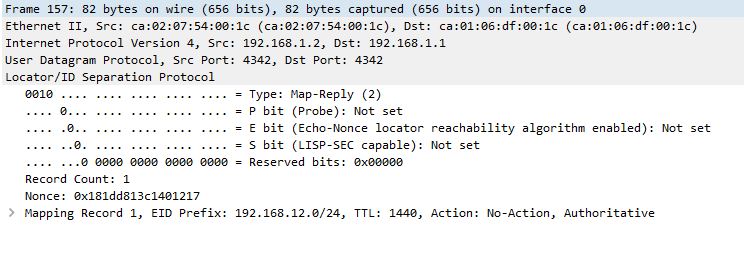
LISP Map-Reply


domingo, 2 de abril de 2017

OSPF MULTIAREA DMVPN TRACK


.


1 DMVPN R5:HUB;   
     R1, R2, R3  SPOKEs

2. Configurar OSPF Multiarea
R5 Interfaces lo 10:     192.168.10.1/27
                   lo 11:     192.168.11.1/24
                    lo 12      192.168.12.1/24
                    lo 13:     192.168.13.1/24
Sumarizar

3. IP SLA si lo 0 de R5 este activo el trafico de R7 vaya por R1, en caso contrario que sea R2


sábado, 25 de marzo de 2017

OSPF Multiarea


OSPF Multiarea


                                        Area 10 totally stub area
                                        Area 30 totally nssa area